Infinite Campus On-Line Student Payments
The directions to pay for student food service accounts on-line are outlined below. Adult lunches will still need to be paid at each school. There is a $2.00 transaction fee automatically added for this service and a $5.00 minimum payment requirement.
Directions for Electronic Food Service Accounts On-line through Infinite Campus
- Log on to Infinite Campus with your username and password.
- Click on the Food Service from the left hand menu using the three veritcal bars.
- If this is your first time using the Payment option through Infinite Campus you first need to register your credit card and bank information.
- Select My Accounts, then Payment Methods, then New at the bottom of the page.
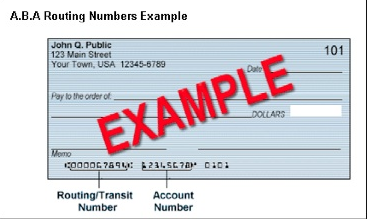
- Click the appropriate button for Savings, Checking or Debit. For your checking account:
- The router number is the first set of nine (9) numbers.
- The checking account number is the next set of numbers.
- After entering your information, click save.
- Verify the information you entered is correct and click save again.
- Click the three vertical bars in the upper left hand corner and select Food Service.
- Click Pay. Put in the dollar amount (minimum of $5.00) in the white box.
- Click Add to Cart.
- Confirm account information.
- Click continue.
- Click make payment.
- A receipt will be emailed to the email address listed in Infinite Campus.
- If you have “adobe flash player” loaded on your computer you can click the print/view button to see or print a receipt too.
Payments will automatically be withdrawn from the account you have chosen and entered into the students food service account.
|